New Heights Climbing New Heights Control Sheet
Default keyboard map after the 2026 rework — rebind in Options if you need to.
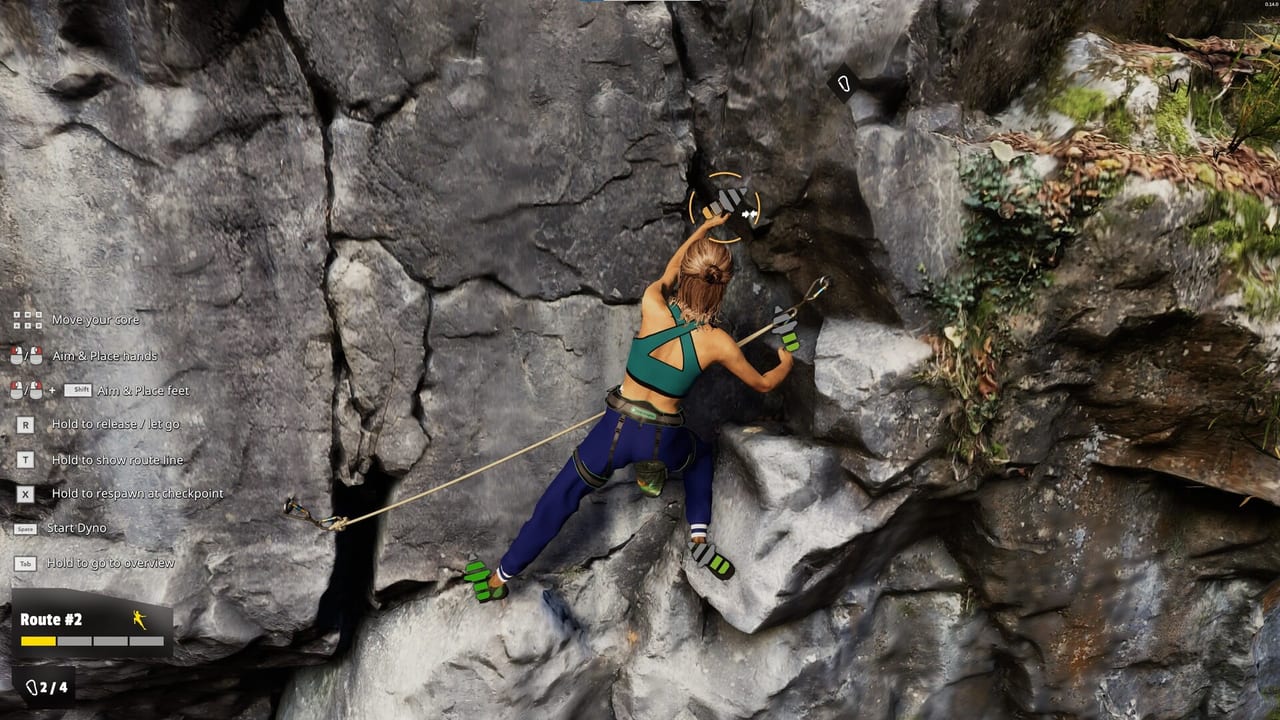
Keep this page on a phone or second monitor. Prose explanations live in the controls guide. Keys below are defaults. Steam Deck and DualSense use the official controller map; swap bumpers onto hands if that feels better.
Limbs
| Action | Default |
|---|---|
| Aim / place left hand | Hold left mouse, release to grab |
| Aim / place right hand | Hold right mouse, release to grab |
| Aim / place left foot | Shift + left mouse |
| Aim / place right foot | Shift + right mouse |
| Auto-drop feet (if enabled) | W |
| Release / let go | Hold R |
| Move core / hips | WASD |
| Extra weight shift | Q / E |
Reach bands on a hand aim: high (hat), mid (shoulder), low (shoelace). Empty arrow = no hold. Red = bad angle. Amber = smear. Green = commit. Pull holds face away; push holds face you. Opposite directions grant inverse support.
Route, rope, and view
| Action | Default |
|---|---|
| Show route line | Hold T |
| Respawn at checkpoint / bolt | Hold X |
| Crag overlay (stars, boards) | Hold Tab |
| Start dyno | Space |
| Clip next bolt | Touch the bolt (2026 sport) |
| Reel / feed rope | On-rope rest controls (see belaying) |
Timed mode and ghosts are overlay / options checkboxes, not keys. Fall-time penalties apply only when timed mode is on.
Workshop recording
| Action | Keyboard | Controller |
|---|---|---|
| Place checkpoint | F | D-pad right |
| Finish route (hold) | F | D-pad right |
| Cancel route (hold) | G | D-pad left |
Record in explore mode. Checkpoints belong on rests and clip stances. Full steps: Workshop.
Options that change the feel
Rebind list, target FPS, automatic camera reset, automatic limb release, automatic feet, competitive ghosts, fall duration before respawn, textureless surface scan. Turn automatic feet off once outdoor smears matter. Textureless scan is recommended on Font when albedo lies.
First-session reminder
Gym first (getting started). Then an A-tier outdoor circuit from the route ranking. Do not invent extra buttons. If a prompt on the left disagrees with this sheet after a patch, trust the prompt and check patch notes.
Print, climb, rebind only after a fall that was clearly the key’s fault — not the hip’s.
Arrow grammar, one more time
Empty: stop aiming, move the cursor. Red: move the hips or pick another feature. Amber: smear, do not camp. Green: weight it, then bring WASD under it before you match. Inverse support is the sticky feeling on opposite-facing volumes — both contacts have to agree. If the arrow is green and you still peel, the other three points are the lie, not the one you are staring at. Longer physics notes sit in how to climb.
Controller shorthand
Map left bumper to left hand, right bumper to right hand, a trigger modifier to feet, a face button to R, and a dedicated dyno input away from jump-if-you-rebound-from-another-game. Steam Deck’s default already works; this shorthand is for people who keep pressing a platformer jump and wondering why the climber dynos into space.
After a patch
If the left-edge prompt shows a new key, that prompt wins. Update this sheet against Steam news, not against muscle memory. The updates hub is the date check. Then go back to the gym wall for one inverse-support lap so the new bind hits a hold, not a forum post.
Frequently Asked Questions
Quick answers to the most common questions.
Why won't a planted hand let go?
You need R. Clicking the same mouse button aims; it does not drop a locked limb.
What is Shift for?
Feet. Same mouse buttons as hands, with Shift held.
Can I use a controller?
Yes. Full controller support and Steam Deck Verified. Rebind in Options and keep a dedicated release button.