New Heights Climbing New Heights Controls
One button per limb, plus the core keys that keep you on the wall.
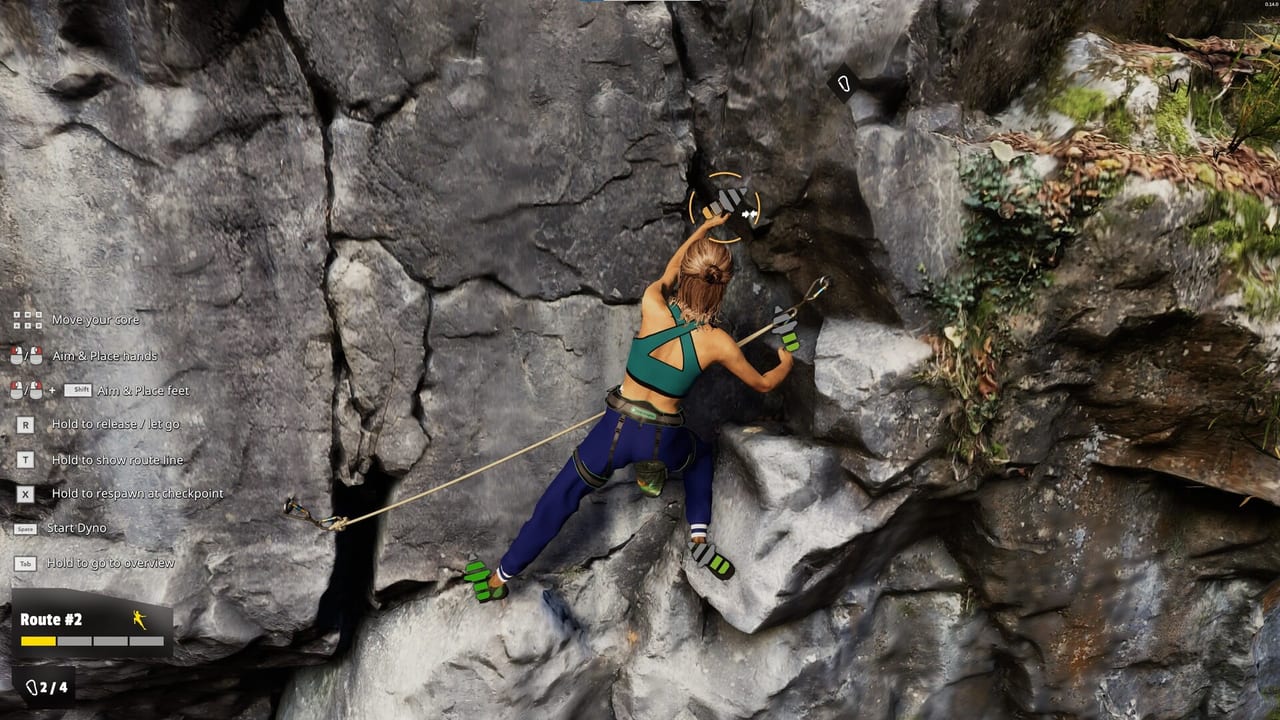
New Heights is a limb-by-limb sim. If you treat it like a parkour game and mash jump, you fall. This page is the default keyboard and mouse map after the 2026 climbing rework, plus how the on-screen arrows tell you whether a grab will stick. Rebind anything in Options. For a one-screen cheat sheet, use the control sheet. For the physics behind the keys, read how to climb.
Hands and feet
Hold the left mouse button to aim the left hand. Hold the right mouse button to aim the right hand. Move the cursor around the climber to choose high, mid, or low reaches — think hat, shoulder, shoelace. Release to grab. A chalk puff and a locked joint means the hold registered. Clicking again on a planted hand does not automatically release it; that is R.
Feet use the same mouse buttons with Shift held. Left Shift plus left mouse is the left foot, Shift plus right mouse is the right foot. If automatic foot placement is enabled, tapping W parks the feet on nearby features so you can think about hands first. Turn that helper off once you start missing smears on real Font slopers.
Core, camera, and release
WASD walks the hips. Q and E add the extra weight shifts you need on traverses and roofs. The climber is a physics body: if the core lags behind a long reach, the new hand may be green while total support is still too low. Move the hips under the good hold before you let go of the old one.
R held releases the active limb or lets go when you need to match. T held draws the route line so you can see the intended sequence. X held respawns at the last checkpoint or bolt. Tab held opens the crag overview with route markers, stars, and the leaderboard panel. Space starts a dyno — a committed jump that the 2024 patches made less abusable and less disorienting.
In explore / Workshop recording, F places a checkpoint or finishes a route when held, and G cancels a recording. Those two keys are why custom lines can be shared without a Unity project. Full recording steps are on the Workshop page.
Arrows, colours, and rope prompts
Every aimed limb shows an arrow. Empty means no usable feature. Red means the feature exists but will not hold your weight from this body position. Amber is a smear or a poor angle. Green is a hold you can commit to. Arrow direction also encodes pull versus push: holds that face away are pullable; holds that face you are pushable. Opposite-direction contacts stack an inverse-support bonus, which is why the gym’s yellow volumes feel sticky once both hands agree.
On bolted routes the 2026 rope is automatic at the start. Climb toward the next bolt, touch it to clip, and fall onto the rope instead of the ground. While hanging you can reel in or feed slack. Power boost (called out in the 2026 gameplay videos) adds a short strength spike for a hard move — treat it as a last resort, not a default. See belaying for the rest of the rope loop, including the limited rappel.
Controller and accessibility
Full controller support and DualSense are on the Steam page. Steam Deck is Verified: default icons, readable text, and a layout that works without extra community configs. If you climb with a pad, map one bumper per hand and keep a dedicated release button. Mouse still wins for pixel-precise crimps on scanned limestone.
Options worth turning on early: automatic camera reset, target FPS cap, fall-time before respawn, and textureless surface scan if albedo textures trick you into grabbing painted cracks. Competitive ghost options sit next to leaderboard filters. None of these replace reading the getting started gym path.
Rebind before Hanshelleren. The cave is huge, the holds are bad, and you will not have time to remember that Shift is feet. When the map is in your hands, pick a first outdoor circuit from locations and a grade from the route ranking.
Frequently Asked Questions
Quick answers to the most common questions.
How do I let go of a hand?
Hold R to release. Aiming the same mouse button again does not drop a planted limb.
Why is the arrow green but I still fall?
The hold is valid but your core is off the wall or another contact is red. Move WASD under the green limb before you match.
Can I rebind keys?
Yes. Options includes a full rebind list. Update your notes if you change F, G, or R — Workshop recording uses those defaults.
Does a controller work on Steam Deck?
Steam Deck is Verified with the default controller configuration. You can still prefer mouse for scanned crimps.